Showing posts with label JQuery. Show all posts

Tuesday, December 10, 2013

Grid View Progress Bar Using Jquery

Grid View Progress Bar Using Jquery.

Hi Friends,
Here i will explain you how to implement Grid View Progress Bar Using Jquery.

ON ASPX  PAGE :-
Paste below Script in your head tag.

<script type="text/javascript" src="http://code.jquery.com/jquery-1.8.2.js"></script>  
    <script type="text/javascript">
        $(function () {
            $('#btnClick').click(function () {
                $('#Div').fadeTo('slow', .2);
                $('#Div').append('<img src="../Images/animated.gif" style="background-color:Aqua;position:fixed; top:20%; left:16%;"/></div>');
                setTimeout(function () { GetData() }, 800)
            })
        });
        function GetData() {
            $.ajax({
                type: "POST",
                contentType: "application/json; charset=utf-8",
                url: "JqueryProgressBar.aspx/filldatagrid",
                data: "{}",
                dataType: "json",
                success: function (data) {
                    var theHtml = data.d;
                    $('#Griddiv').html(theHtml)
                    $('#Div').html("");
                },
                error: function (result) {
                    alert("Error");
                }
            });
        }
    </script>


Paste below code in  form tag.

<div id="Div">
    </div>
    <input type="button" id="btnClick" value="GridView" />
    <div id="Griddiv">
    </div>


ON CODE BEHIND ASPX.CS :-

[WebMethod]
        public static string filldatagrid()
        {
            GridView gv = new GridView();
            System.IO.StringWriter stringWriter = new System.IO.StringWriter();
            HtmlTextWriter htmlWriter = new HtmlTextWriter(stringWriter);
            DataSet ds = manager.GetRecords();//Function for getting records
            DataTable dt = ds.Tables[0];
            gv.DataSource = dt;
            gv.DataBind();
            gv.RenderControl(htmlWriter);
            return stringWriter.ToString();
        }


CREATE A STORED PROCEDURE :-
CREATE PROCEDURE [dbo].[usp_SelectRegistration]
   
AS
BEGIN
    SELECT Pid ,FullName,CONVERT(varchar(30),DOB,101) AS DOB,Gender
    FROM form Order by Pid
END

ON BUSINESS LAYER MANAGER CLASS :- On your bussiness layer paste code below
 public static DataSet GetRecords()
        {

            return BusinessLayer.Dataaccess.DataAccess.GetData("usp_SelectRegistration", null);
        }
//usp_SelectRegistration is stored procedure name //DataAccess is class in dataaccess layer //GetData is function for getting data using connection string
ON DATAACCESS LAYER :-
public static DataSet GetData(string SPName, List<SqlParameter> Parameters)
        {
            using (SqlConnection con = new SqlConnection(System.Configuration.ConfigurationManager.ConnectionStrings["ApplicationServices"].ConnectionString))
            {
                using (SqlCommand cmd = new SqlCommand())
                {
                    cmd.CommandText = SPName;
                    cmd.CommandType = System.Data.CommandType.StoredProcedure;
                    cmd.Connection = con;

                    if (Parameters != null)
                    {
                        foreach (SqlParameter parameter in Parameters)
                        {
                            cmd.Parameters.Add(parameter);
                        }
                    }
                    con.Open();
                    DataSet ds = new DataSet();
                    SqlDataAdapter da = new SqlDataAdapter();
                    da.SelectCommand = cmd;
                    da.Fill(ds);
                    con.Close();
                    return ds;
                }
            }
        }

ON WEB.CONFIG :- Now add connection string in your webconfig,add code below..
<connectionStrings>
    <add name="ApplicationServices" connectionString="Data Source=10.1.1.1;Initial Catalog=DailyTaskoskar;Persist Security Info=True;User ID=Username;Password=Password" providerName="System.Data.SqlClient"/>
   
  </connectionStrings>


Friday, November 29, 2013

Pop-Up Div Using Jquery

CSS :-

<style type="text/css">
        /* popup_box DIV-Styles*/#popup_box
        {
            display: none; /* Hide the DIV */
            position: fixed;
            _position: absolute; /* hack for
    internet explorer 6 */
            height: 175px;
            width: 400px;
            background: #FFFFFF;
            left: 300px;
            top: 150px;
            z-index: 100; /* Layering ( on-top of others), if you have lots of layers:
    I just maximized, you can change it yourself */
            margin-left: 15px; /* additional
    features, can be omitted */
            border: 2px solid #ff0000;
            padding: 15px;
            font-size: 15px;
            -moz-box-shadow: 0 0 5px #ff0000;
            -webkit-box-shadow: 0 0 5px #ff0000;
            box-shadow: 0 0 5px #ff0000;
        }
        #container
        {
            background: #d2d2d2; /*Sample*/
            width: 100%;
            height: 100%;
        }
        a
        {
            cursor: pointer;
            text-decoration: none;
        }
        /* This is for the positioning of
    the Close Link */#popupBoxClose
        {
            font-size: 20px;
            line-height: 15px;
            right: 5px;
            top: 5px;
            position: absolute;
            color: #6fa5e2;
            font-weight: 500;
        }
    </style>

Jquery :-

<script src="http://jqueryjs.googlecode.com/files/jquery-1.2.6.min.js" type="text/javascript"></script>
    <script type="text/javascript">

        $(document).ready(function () {

            // When site loaded, load the Popupbox First
            loadPopupBox();

            $('#popupBoxClose').click(function () {
                unloadPopupBox();
            });

            $('#container').click(function () {
                unloadPopupBox();
            });

            function unloadPopupBox() {    // TO Unload the Popupbox
                $('#popup_box').fadeOut("slow");
                $("#container").css({ // this is just for style      
                    "opacity": "1"
                });
            }

            function loadPopupBox() {    // To Load the Popupbox
                $('#popup_box').fadeIn("slow");
                $("#container").css({ // this is just for style
                    "opacity": "0.3"
                });
            }
        });
    </script>

ASPX CODE :-

<div id="popup_box">
            <h1>
                <table class="style1">
            <tr>
                <td>
                    <asp:Label ID="lblCountry" runat="server" Text="Country"></asp:Label>&nbsp;</td>
                <td>
                    <asp:TextBox ID="txtCountry" runat="server"></asp:TextBox>&nbsp;</td>
            </tr>
            <tr>
                <td>
                    <asp:Label ID="lblState" runat="server" Text="State"></asp:Label>&nbsp;</td>
                <td>
                    <asp:TextBox ID="txtState" runat="server"></asp:TextBox>&nbsp;</td>
            </tr>
            <tr>
                <td>
                    <asp:Label ID="lblCity" runat="server" Text="City"></asp:Label>&nbsp;</td>
                <td>
                    <asp:TextBox ID="txtCity" runat="server"></asp:TextBox>&nbsp;</td>
            </tr>
            <tr>
                <td>
                    &nbsp;</td>
                <td>
                    <asp:Button ID="btnsa" runat="server" Text="Button" OnClientClick="save();" />&nbsp;</td>
            </tr>
        </table></h1>
            <a id="popupBoxClose">Close</a>
        </div>


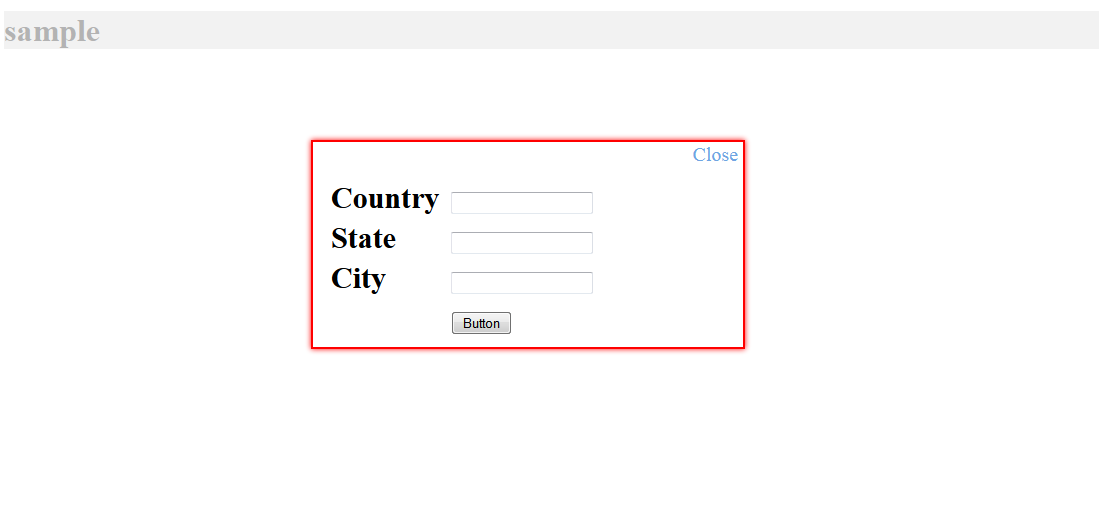
POPUP DIV LOOK LIKE THIS :-


Another Method of Bind Gridview using JSON

JQUERY :-

<script type="text/javascript" src="http://ajax.googleapis.com/ajax/libs/jquery/1.8.3/jquery.min.js"></script>
<script type="text/javascript">
        $(function () {
            $.ajax({
                type: "POST",
                url: "BindgridusingWebMethod.aspx/GetUserInfoData",
                data: '{}',
                contentType: "application/json; charset=utf-8",
                dataType: "json",
                success: OnSuccess,
                failure: function (response) {
                    alert("Failure : " + response.d);
                },
                error: function (response) {
                    alert("Error : " + response.d);
                }
            });
        });

        function OnSuccess(response) {
            var xmlDoc = $.parseXML(response.d);
            var xml = $(xmlDoc);
            var users = xml.find("Table");
            //create a new row from the last row of gridview
            var row = $("[id*=grdDemo] tr:last-child").clone(true);
            //remove the lst row created by binding the dummy row from code behind on page load
            $("[id*=grdDemo] tr").not($("[id*=grdDemo] tr:first-child")).remove();
            var count = 1;
            $.each(users, function () {
                //var users = $(this);               
                $("td", row).eq(0).html($(this).find("FullName").text());
                $("td", row).eq(1).html($(this).find("DOB").text());
                $("td", row).eq(2).html($(this).find("Gender").text());
                $("td", row).eq(3).html($(this).find("MobileNo").text());
                $("td", row).eq(4).html($(this).find("Salary").text());
                $("td", row).eq(5).html($(this).find("Isactive").text());
                $("[id*=grdDemo]").append(row);
                //define the background stryle of newly created row        
                if (count == 1 || (count % 2 != 0)) {
                    $(row).css("background-color", "#ffffff");
                }
                else {
                    $(row).css("background-color", "#D2CDCD");
                }
                count = count + 1;
                row = $("[id*=grdDemo] tr:last-child").clone(true);
            });
        }
    </script>

ASPX CODE :-

<asp:ScriptManager ID="ScriptManager1" runat="server" EnablePageMethods="true">
    </asp:ScriptManager>
<asp:Button ID="btnshowgrid" runat="server" Text="Show Gridview" OnClick="btnshowgrid_Click" />&nbsp;<asp:Button
        ID="clear" runat="server" Text="Clear" onclick="clear_Click" />
<div>
        <asp:GridView ID="gvDetails" runat="server" >
            <HeaderStyle BackColor="#474747" Font-Bold="true" ForeColor="White" />
        </asp:GridView>
        <br />
        <asp:GridView ID="grdDemo" runat="server" AutoGenerateColumns="false">
        <HeaderStyle BackColor="#474747" Font-Bold="true" ForeColor="White" />
            <Columns>
                <asp:BoundField DataField="FullName" HeaderText="Full Name" />
                <asp:BoundField DataField="DOB" HeaderText="DOB" />
                <asp:BoundField DataField="Gender" HeaderText="Gender" />
                <asp:BoundField DataField="MobileNo" HeaderText="Mobile No." />
                <asp:BoundField DataField="Salary" HeaderText="Salary" />
                <asp:BoundField DataField="Isactive" HeaderText="Isactive" />
           </Columns>
        </asp:GridView>
    </div>

CODE BEHIND :-

protected void btnshowgrid_Click(object sender, EventArgs e)
        {
            BindgridRow();
        }

private void BindgridRow()
        {
            DataTable dummy = new DataTable();
            dummy.Columns.Add("FullName");
            dummy.Columns.Add("DOB");
            dummy.Columns.Add("Gender");
            dummy.Columns.Add("MobileNo");
            dummy.Columns.Add("Salary");
            dummy.Columns.Add("Isactive");
            dummy.Rows.Add();
            grdDemo.DataSource = dummy;
            grdDemo.DataBind();
        }

[WebMethod]
        public static string GetUserInfoData()
        {
            string query = "SELECT FullName,CONVERT(varchar(30),DOB,101) AS DOB,Gender,MobileNo,Salary,Isactive    FROM form ORDER BY Pid ";
            string strConnString = ConfigurationManager.ConnectionStrings["ApplicationServices"].ConnectionString;
            using (SqlConnection con = new SqlConnection(strConnString))
            {
                using (SqlCommand cmd = new SqlCommand(query, con))
                {
                    using (SqlDataAdapter sda = new SqlDataAdapter())
                    {
                        cmd.Connection = con;
                        sda.SelectCommand = cmd;
                        using (DataSet ds = new DataSet())
                        {
                            sda.Fill(ds);
                            return ds.GetXml();
                        }
                    }
                }
            }
        }

protected void clear_Click(object sender, EventArgs e)
        {
            grdDemo.DataSource = null;
            grdDemo.DataBind();
        }

CLICK ON BUTTON :-

Bind Grid View Using Jquery And Give Header Text From Code Behind

JQUERY :-

<script type="text/javascript" src="http://ajax.googleapis.com/ajax/libs/jquery/1.8.3/jquery.min.js"></script>
    <script type="text/jscript">
        $(document).ready(function () {
            $.ajax({
                type: "POST",
                contentType: "application/json; charset=utf-8",
                url: "BindgridusingWebMethod.aspx/BindDatatable",
                data: "{}",
                dataType: "json",
                success: function (data) {
                    for (var i = 0; i < data.d.length; i++) {
                        $("#gvDetails").append("<tr><td>" + data.d[i].UserId + "</td><td>" + data.d[i].UserName + "</td><td>" + data.d[i].Location + "</td></tr>");
                    }
                },
                error: function (result) {
                    alert("Error");
                }
            });
        });
    </script>

ASPX CODE :-
<asp:Button ID="btnshowgrid" runat="server" Text="Show Gridview" OnClick="btnshowgrid_Click" />&nbsp;<asp:Button
        ID="clear" runat="server" Text="Clear" onclick="clear_Click" />
<asp:GridView ID="gvDetails" runat="server" >
            <HeaderStyle BackColor="#474747" Font-Bold="true" ForeColor="White" />
        </asp:GridView>

NAMESPACE :-

using System;
using System.Data;
using System.Data.SqlClient;
using System.Web.Services;
using System.Collections.Generic;

CODE BEHIND :-

private void BindColumnToGridview()
        {
            DataTable dt = new DataTable();
            dt.Columns.Add("fullname");
            dt.Columns.Add("DOB");
            dt.Columns.Add("Gender");
            dt.Rows.Add();
            gvDetails.DataSource = dt;
            gvDetails.DataBind();
            gvDetails.Rows[0].Visible = false;
        }

[WebMethod]
        public static entity[] BindDatatable()
        {
            DataTable dt = new DataTable();
            List<entity> details = new List<entity>();

            using (SqlConnection con = new SqlConnection("Data Source=10.1.1.1;Initial Catalog=DailyTaskoskar;Persist Security Info=True;User ID=Username;Password=Password"))
            {
                using (SqlCommand cmd = new SqlCommand("SELECT FullName,CONVERT(varchar(30),DOB,101) AS DOB,Gender    FROM form ", con))
                {
                    con.Open();
                    SqlDataAdapter da = new SqlDataAdapter(cmd);
                    da.Fill(dt);
                    foreach (DataRow dtrow in dt.Rows)
                    {
                        entity user = new entity();
                        user.UserId = dtrow["fullname"].ToString();
                        user.UserName = dtrow["DOB"].ToString();
                        user.Location = dtrow["Gender"].ToString();
                        details.Add(user);
                    }
                }
            }
            return details.ToArray();
        }

protected void btnshowgrid_Click(object sender, EventArgs e)
        {
            BindColumnToGridview();
         }

protected void clear_Click(object sender, EventArgs e)
        {
            gvDetails.DataSource = null;
            gvDetails.DataBind();
        }

Click on Button :-


Tuesday, November 26, 2013

SlideShow Using Jquery


Image Slider

<html xmlns="http://www.w3.org/1999/xhtml">
<head>
<title>JQuery Photo Slider with Semi Transparent Caption</title>
<script src="http://code.jquery.com/jquery-1.8.2.js" type="text/javascript"></script>
<script type="text/javascript">
$(function () {
//Execute the slideShow
slideShow();
});
function slideShow() {
//Set the opacity of all images to 0
    $('#slideshow a').css({ opacity: 0.0 });
//Get the first image and display it (set it to full opacity)
    $('#slideshow a:first').css({ opacity: 1.0 });
//Set the caption background to semi-transparent
    $('#slideshow .caption').css({ opacity: 0.7 });
//Resize the width of the caption according to the image width
    $('#slideshow .caption').css({ width: $('#slideshow a').find('img').css('width') });
//Get the caption of the first image from REL attribute and display it
    $('#slideshow .content').html($('#slideshow a:first').find('img').attr('rel'))
.animate({ opacity: 0.7 }, 400);
//Call the gallery function to run the slideshow, 6000 = change to next image after 6 seconds
setInterval('gallery()', 3000);
}
function gallery() {
//if no IMGs have the show class, grab the first image
    var current = ($('#slideshow a.show') ? $('#slideshow a.show') : $('#slideshow a:first'));
//Get next image, if it reached the end of the slideshow, rotate it back to the first image
    var next = ((current.next().length) ? ((current.next().hasClass('caption')) ? $('#slideshow a:first') : current.next()) : $('#slideshow a:first'));
//Get next image caption
var caption = next.find('img').attr('rel');
//Set the fade in effect for the next image, show class has higher z-index
next.css({ opacity: 0.0 })
.addClass('show')
.animate({ opacity: 1.0 }, 1000);
//Hide the current image
current.animate({ opacity: 0.0 }, 1000)
.removeClass('show');

//Set the opacity to 0 and height to 1px
$('#slideshow .caption').animate({ opacity: 0.0 }, { queue: false, duration: 0 }).animate({ height: '1px' }, { queue: true, duration: 300 });
//Animate the caption, opacity to 0.7 and heigth to 100px, a slide up effect
$('#slideshow .caption').animate({ opacity: 0.7 }, 100).animate({ height: '100px' }, 500);
//Display the content
$('#slideshow .content').html(caption);
}
</script>
<style type="text/css">
body{
font-family:arial
}
.clear {
clear:both
}
#slideshow {
position:relative;
height:360px
}
#slideshow a {
float:left;
position:absolute;
}
#slideshow a img {
border:none;
}
#slideshow a.show {
z-index:500
}
#slideshow .caption {
z-index:600;
background-color:#000;
color:#ffffff;
height:100px;
width:100%;
position:absolute;
bottom:0;
}
#slideshow .caption .content {
margin:5px
}
#slideshow .caption .content h3 {
margin:0;
padding:0;
color:#1DCCEF;
}
</style>
</head>
<body>
<form id="form1" runat="server">
<div id="slideshow">
<a href="#" class="show">
<img src="http://www.webchief.co.uk//blog/simple-jquery-slideshow/slide1.jpg" alt="1" height="300" rel="<h3>Slide1 Sample</h3>"/>
</a>
<a href="#">
<img src="http://www.webchief.co.uk//blog/simple-jquery-slideshow/slide2.jpg" alt="2"  height="300" rel="<h3>Slide2 Example</h3>"/>
</a>
<a href="#">
<img src="http://www.webchief.co.uk//blog/simple-jquery-slideshow/slide3.jpg" alt="3" height="300" rel="<h3>Slide3 Example</h3>"/>
</a>
<div class="caption"><div class="content"></div></div>
</div>
<div class="clear"></div>
</form>
</body>
</html>