Friday, December 6, 2013

Simple WCF service example for beginners.

Hi Friends,

Here I will explain what WCF (windows communication foundation) is,and how to implement simple example to understand,How to use WCf Service.

What WCF is ?

Windows Communication Foundation (WCF) is a technology for developing applications based on service-oriented architecture (SOA). WCF is implemented using a set of classes placed on top of the .NET Common Language Runtime (CLR). It addresses the problem of interoperability using .NET for distributed applications.


WCF is entirely based on the .NET framework. It is primarily implemented as a set of classes that correspond to the CLR in the .NET framework. However, WCF allows .NET application developers to build service-oriented applications. The WCF client uses Simple Object Access Protocol (SOAP) to communicate with the server. The client and server are independent of the operating system, hardware and programming platform, and communication takes place at a high level of abstraction.

Creating a simple WCF Service :-


Once you create application you got in solution explorer like below 

Now double click on Iservice1.cs and paste code below

 [ServiceContract]
    public interface IService1
    {
        [OperationContract]
        string
SampleMethod(string Name);
    } 


 Now double click on service1.svc and paste code below

public class Service1 : IService1
    {
        public string
SampleMethod(string Name)
        {
            return "Hello " + Name + " Welcome to your first WCF program";
        }
    } 


Know Press F5 and build solution


 Know right click on service1.svc and view in browser and copy url.

Now for calling your first WCF service take another new project.
To call WCF service there are many ways like using console app, windows app and web app but here I am going for console application.

Name it FirstWCFServiceConsole

 
After it in Solution explorer Right-Click on Add References and Click on Add Service refrences.

Window apperes like below paste url which you copies early in service view in browser.


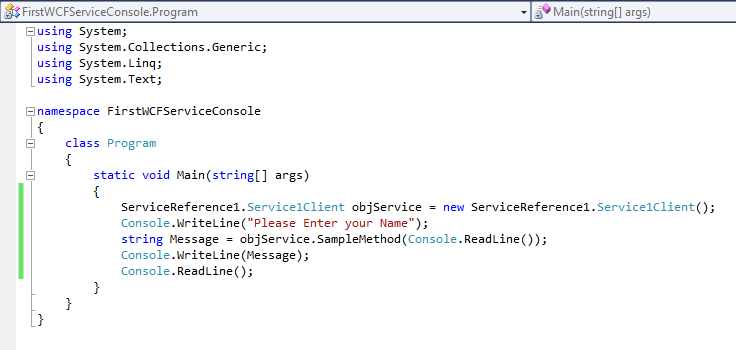
Now paste code in Program.cs like below

ServiceReference1.Service1Client objService = new ServiceReference1.Service1Client();
            Console.WriteLine("Please Enter your Name");
            string Message = objService.SampleMethod(Console.ReadLine());
            Console.WriteLine(Message);
            Console.ReadLine();
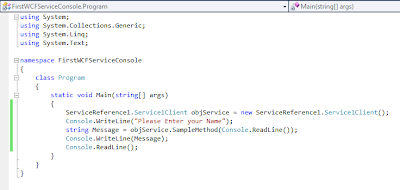


 Now open app.config paste copied url in endpoint address="" like below

 
Now the console application


Ajax Cascading Dependent Dropdown list Bind from Database.

Hi Friends,

Here I will explain how to use Cascading dropdownlist with database using asp.net

First of all add three tables like below..

Country


State


City


After this add reference of AjaxControlToolKit.dll and AjaxMin.dll in you solution References like below,remeber both dll file must be added to references.


ON ASPX PAGE :-

Add Code code like below

<%@ Register Assembly="AjaxControlToolkit" Namespace="AjaxControlToolkit" TagPrefix="asp" %>


<asp:ToolkitScriptManager ID="ToolkitScriptManager1" runat="server">
    </asp:ToolkitScriptManager>
    <div>
        <table>
            <tr>
                <td>
                    Select Country:
                </td>
                <td>
                    <asp:DropDownList ID="ddlcountry" runat="server">
                    </asp:DropDownList>
                    <asp:CascadingDropDown ID="ccdCountry" runat="server" Category="Country" TargetControlID="ddlcountry"
                        PromptText="Select Country" LoadingText="Loading Countries.." ServiceMethod="BindCountryDetails"
                        ServicePath="~/AjaxCascadingDropDown.asmx">
                    </asp:CascadingDropDown>
                </td>
            </tr>
            <tr>
                <td>
                    Select State:
                </td>
                <td>
                    <asp:DropDownList ID="ddlState" runat="server">
                    </asp:DropDownList>
                    <asp:CascadingDropDown ID="ccdState" runat="server" Category="State" ParentControlID="ddlcountry"
                        TargetControlID="ddlState" PromptText="Select State" LoadingText="Loading States.."
                        ServiceMethod="BindStateDetails" ServicePath="~/AjaxCascadingDropDown.asmx">
                    </asp:CascadingDropDown>
                </td>
            </tr>
            <tr>
                <td>
                    Select Region:
                </td>
                <td>
                   <asp:DropDownList ID="ddlCity" runat="server">
                    </asp:DropDownList>
                     <asp:CascadingDropDown ID="ccdCity" runat="server" Category="City" ParentControlID="ddlState"
                        TargetControlID="ddlCity" PromptText="Select City" LoadingText="Loading City.."
                        ServiceMethod="BindCityDetails" ServicePath="~/AjaxCascadingDropDown.asmx">
                    </asp:CascadingDropDown>
                </td>
            </tr>
        </table>
    </div>
    

Now add a webservice in your project and name it  AjaxCascadingDropDown.asmx

Now open web service and paste namespaces like below

using System;
using System.Collections;
using System.Web;
using System.Web.Services;
using System.Web.Services.Protocols;
using System.Data.SqlClient;
using System.Collections.Generic;
using System.Collections.Specialized;
using AjaxControlToolkit;
using System.Configuration;
using System.Data; 


namespace DailyTask
{
    [WebServiceBinding(ConformsTo = WsiProfiles.BasicProfile1_1)]
    [System.Web.Script.Services.ScriptService()]
    public class AjaxCascadingDropDown : System.Web.Services.WebService
    {
        private static string strconnection = ConfigurationManager.ConnectionStrings["ApplicationServices"].ToString();
       
        SqlConnection concountry = new SqlConnection(strconnection);
        public AjaxCascadingDropDown()
        {

        }
        [WebMethod]
        public CascadingDropDownNameValue[] BindCountryDetails(string knownCategoryValues, string category)
        {
            concountry.Open();
            SqlCommand cmdcountry = new SqlCommand("select * from task6CountryTable", concountry);
            cmdcountry.ExecuteNonQuery();
            SqlDataAdapter dacountry = new SqlDataAdapter(cmdcountry);
            DataSet dscountry = new DataSet();
            dacountry.Fill(dscountry);
            concountry.Close();
            List<CascadingDropDownNameValue> countrydetails = new List<CascadingDropDownNameValue>();
            foreach (DataRow dtrow in dscountry.Tables[0].Rows)
            {
                string CountryID = dtrow["CountryId"].ToString();
                string CountryName = dtrow["CountryName"].ToString();
                countrydetails.Add(new CascadingDropDownNameValue(CountryName, CountryID));
            }

            return countrydetails.ToArray();
        }


        [WebMethod]
        public CascadingDropDownNameValue[] BindStateDetails(string knownCategoryValues, string category)
        {
            int countryID;
            StringDictionary countrydetails = AjaxControlToolkit.CascadingDropDown.ParseKnownCategoryValuesString(knownCategoryValues);
            countryID = Convert.ToInt32(countrydetails["Country"]);
            concountry.Open();
            SqlCommand cmdstate = new SqlCommand("select * from task6StateTable where CountryID=@CountryID", concountry);
            cmdstate.Parameters.AddWithValue("@CountryID", countryID);
            cmdstate.ExecuteNonQuery();
            SqlDataAdapter dastate = new SqlDataAdapter(cmdstate);
            DataSet dsstate = new DataSet();
            dastate.Fill(dsstate);
            concountry.Close();
            List<CascadingDropDownNameValue> statedetails = new List<CascadingDropDownNameValue>();
            foreach (DataRow dtrow in dsstate.Tables[0].Rows)
            {
                string StateID = dtrow["StateID"].ToString();
                string StateName = dtrow["StateName"].ToString();
                statedetails.Add(new CascadingDropDownNameValue(StateName, StateID));
            }
            return statedetails.ToArray();
        }


        [WebMethod]
        public CascadingDropDownNameValue[] BindCityDetails(string knownCategoryValues, string category)
        {
            int stateID;
            StringDictionary statedetails = AjaxControlToolkit.CascadingDropDown.ParseKnownCategoryValuesString(knownCategoryValues);
            stateID = Convert.ToInt32(statedetails["State"]);
            concountry.Open();
            SqlCommand cmdcity = new SqlCommand("select * from task6CityTable where StateID=@StateID", concountry);
            cmdcity.Parameters.AddWithValue("@StateID", stateID);
            cmdcity.ExecuteNonQuery();
            SqlDataAdapter dacity = new SqlDataAdapter(cmdcity);
            DataSet dscity = new DataSet();
            dacity.Fill(dscity);
            concountry.Close();
            List<CascadingDropDownNameValue> citydetails= new List<CascadingDropDownNameValue>();
            foreach (DataRow dtrow in dscity.Tables[0].Rows)
            {
                string CityID = dtrow["CityID"].ToString();
                string CityName = dtrow["CityName"].ToString();
                citydetails.Add(new CascadingDropDownNameValue(CityName, CityID));
            }
            return citydetails.ToArray();
        }

    }
} 

In Your Web.Config paste code like below :-

<connectionStrings>
    <add name="ApplicationServices" connectionString="Data Source=10.1.1.1;Initial Catalog=DailyTaskoskar;Persist Security Info=True;User ID=Username;Password=password" providerName="System.Data.SqlClient"/>
   
  </connectionStrings> 


Export gridview data to Excel in asp.net C# .

Hi Friends,

Here I will explain how to export gridview data to Excel using asp.net in c#.I have one gridview that has filled with user details now I need to export gridview data toexcel . To implement this functionality first we need to design aspx page like this


ON ASPX PAGE :-

<div>
    <asp:ImageButton ID="imgbtnExport" runat="server" BorderColor="White" ToolTip="Export Data" ImageUrl="~/Excel-icon.png"
                                        OnClick="imgbtnExport_Click" />
    <table>
    <tr>
                <td colspan="2">
                    <asp:GridView ID="gvRecords" AutoGenerateColumns="False" runat="server" >
                        <Columns>

<asp:BoundField DataField="Id" HeaderText="Id" HeaderStyle-BackColor="Orange" />
                                                        <asp:BoundField DataField="fullname" HeaderText="Full Name" HeaderStyle-BackColor="Orange" />
                            <asp:BoundField DataField="DOB" HeaderText="DOB" HeaderStyle-BackColor="Orange"/>
                            <asp:BoundField DataField="Gender" HeaderText="Gender" HeaderStyle-BackColor="Orange"/>
                            <asp:BoundField DataField="MobileNo" HeaderText="Mobile No." HeaderStyle-BackColor="Orange"/>
                            <asp:BoundField DataField="Salary" HeaderText="Salary" HeaderStyle-BackColor="Orange"/>
                            <asp:BoundField DataField="Isactive" HeaderText="Isactive" HeaderStyle-BackColor="Orange"/>
                            <asp:TemplateField HeaderText="Remove" HeaderStyle-BackColor="Orange">
                                <ItemTemplate>
                                    <asp:LinkButton ID="Label2" runat="server" >Remove</asp:LinkButton>
                                </ItemTemplate>
                            </asp:TemplateField>
                        </Columns>
                    </asp:GridView>
                </td>
            </tr>
            </table>
    </div>


ON CODE BEHIND ASPX.CS :-

First of all take your grid view data in viewstate like below..

public void fillDataGrid()
        {
            DataSet ds = new DataSet();
            ds = manager.GetRecords();           
            gvRecords.DataSource = ds.Tables[0];
            ViewState["Export"] = ds.Tables[0];
            gvRecords.DataBind();
        }


protected void imgbtnExport_Click(object sender, ImageClickEventArgs e) // Image Button To Export Grid Recod
        {
            string date = DateTime.Now.ToString("MM-dd-yyyy");

            Response.Clear();
            Response.Buffer = true;

            Response.AddHeader("content-disposition", "attachment;filename=ExcelData.xls");
            Response.Charset = "";

            Response.ContentType = "application/vnd.ms-excel";
            StringWriter sw = new StringWriter();
            HtmlTextWriter hw = new HtmlTextWriter(sw);

            gvRecords.AllowPaging = false;
            DataTable ds = ViewState["Export"] as DataTable;

            DataGrid dg = new DataGrid();
            dg.HeaderStyle.ForeColor = System.Drawing.Color.Blue;
            dg.DataSource = ds;
            dg.DataBind();
            dg.RenderControl(hw);

            string style = @"<style> .textmode { mso-number-format:\@; } </style>";
            Response.Write(style);
            Response.Output.Write(sw.ToString());
            Response.Flush();
            Response.End();
        }


Now you can export your grid view data on excel sheet.


Save it and then open.


Thursday, December 5, 2013

Limit The Number Of Characters In Textarea Using JavaScript.

Hi Friends,

Here I will explain how to limit number of character's in text area.

Javascript :-

Paste this in Head tag of web page.

<script type="text/javascript">
function LimtCharacters(txtMsg, CharLength, indicator) {
chars = txtMsg.value.length;
document.getElementById(indicator).innerHTML = CharLength - chars;
if (chars > CharLength) {
txtMsg.value = txtMsg.value.substring(0, CharLength);
}
}
</script> 


HTML CODE :- 

<div style="font-family:Verdana; font-size:13px">
Number of Characters Left:
<label id="lblcount" style="background-color:#E2EEF1;color:Red;font-weight:bold;">140</label><br/>
<textarea id="mytextbox" rows="5" cols="25" onkeyup="LimtCharacters(this,140,'lblcount');"></textarea>
</div> 


Data Access Methods Used In 3 tier architecture


Hi Friends,

Here I will explain how to access data from database by adding a class in your web-application in 3 tier architecture.

Add a class by right clickon project ->add ->class


Name it class Data and paste code

using System;
using System.Collections.Generic;
using System.Linq;
using System.Text;
using System.Data;
using System.Configuration;
using System.Data.SqlClient;

namespace DataLayer
{
    public static class Data
    {
        static string strConn = ConfigurationManager.AppSettings["DBConn"].ToString();
        private static SqlConnection DBConn = null;
        public static SqlConnection Connection
        {
            get
            {
                if (DBConn == null || DBConn.ConnectionString == "")
                {
                    DBConn = new SqlConnection(strConn);
                }

                return DBConn;
            }
            set { }
        }
        public static DataSet GetDataSet(string SPName, List<SqlParameter> Parameters)
        {
            using (SqlConnection con = Connection)
            {
                using (SqlCommand cmd = new SqlCommand())
                {
                    cmd.CommandText = SPName;
                    cmd.CommandType = System.Data.CommandType.StoredProcedure;
                    cmd.Connection = con;

                    if (Parameters != null)
                    {
                        foreach (SqlParameter parameter in Parameters)
                        {
                            cmd.Parameters.Add(parameter);
                        }
                    }

                    if (con.State != ConnectionState.Open)
                    {
                        con.Open();
                    }
                    DataSet ds = new DataSet();
                    SqlDataAdapter da = new SqlDataAdapter();

                    da.SelectCommand = cmd;
                    da.Fill(ds);
                    con.Close();
                    return ds;
                }
            }
        }
        public static DataSet GetDataByQery(string Query)
        {
            SqlConnection cn = Data.Connection;
            if (cn.State != ConnectionState.Open)
            {
                cn.Open();
            }
            SqlCommand cmd = new SqlCommand();
            cmd.CommandText = Query;
            cmd.CommandType = CommandType.Text;
            cmd.Connection = cn;

            DataSet ds = new DataSet();
            SqlDataAdapter da = new SqlDataAdapter();

            da.SelectCommand = cmd;
            da.Fill(ds);
            cn.Close();
            return ds;
        }
        public static OpeartionResult ExecuteNonQuery(string SPName, List<SqlParameter> Parameters)
        {
            string message = string.Empty;
            using (SqlConnection con = Connection)
            {
                using (SqlCommand cmd = new SqlCommand())
                {
                    cmd.CommandText = SPName;
                    cmd.CommandType = System.Data.CommandType.StoredProcedure;
                    cmd.Connection = con;

                    foreach (SqlParameter parameter in Parameters)
                    {
                        cmd.Parameters.Add(parameter);
                    }

                    SqlParameter MessageId = new SqlParameter("@ReturnValue", SqlDbType.Int, -1);
                    MessageId.Direction = System.Data.ParameterDirection.Output;
                    cmd.Parameters.Add(MessageId);
                    SqlParameter Message = new SqlParameter("@MessageOut", SqlDbType.Char, 500);
                    Message.Direction = System.Data.ParameterDirection.Output;
                    cmd.Parameters.Add(Message);
                    if (con.State != ConnectionState.Open)
                    {
                        con.Open();
                    }
                    cmd.ExecuteNonQuery();

                    OpeartionResult objOR = new OpeartionResult();

                    objOR.ReturnValue = (int)cmd.Parameters["@ReturnValue"].Value;
                    objOR.ReturnMessage = (string)cmd.Parameters["@MessageOut"].Value;

                    con.Close();
                    return objOR;
                }
            }
        }
    }

}

IN WEBCONFIG Add :-

<appsetting>
<add key="DBConn" value="Data Source=10.1.1.1; Initial Catalog=DateBaseName; User ID=UserName; Password=Password;"/>
</appsetting>


Bind Dependent Dropdown Data to Asp.net Dropdownlist from Database in C# using 3 Tier Architecture

Bind Dependent Dropdown Data to Asp.net Dropdown list from Database in C# using 3 Tier Architecture.

Hi Friends,

Here I will explain how to bind dependent dropdown list or show dependent dropdown data in drop-down list from database in asp.net using C# .net.

Before implement this example first design tables in your database as shown below :-


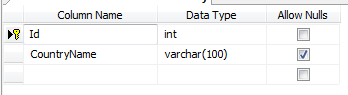
Add table name Country


Add some entries in country


Add table name State


add entry is state table 


Add table name City


add some entries in City table


ON ASPX PAGE :-


<table>
  <tr>
          <td><label class="Label">
                                    Country
                                </label>

          </td>
          <td><asp:DropDownList ID="ddCountryDrpdwn" CssClass="DropDown" runat="server" AutoPostBack="true"
                                    OnSelectedIndexChanged="ddCountryDrpdwn_SelectedIndexChanged">
                                </asp:DropDownList>
                                <asp:RequiredFieldValidator ID="RFVCountry" runat="server" ControlToValidate="ddCountryDrpdwn"
                                    Display="Dynamic" SetFocusOnError="true" ForeColor="Red" CssClass="failureNotification"
                                    ErrorMessage="Select country." InitialValue="0" ToolTip="Select country." ValidationGroup="sbmitbtn"></asp:RequiredFieldValidator>

          </td>
 </tr>
<tr>
          <td><label class="Label">
                                    State
                                </label>

          </td>
          <td><asp:DropDownList ID="ddStateDrpdwn" CssClass="DropDown" runat="server" AutoPostBack="true"
                                    OnSelectedIndexChanged="ddStateDrpdwn_SelectedIndexChanged">
                                </asp:DropDownList>
                                <asp:RequiredFieldValidator ID="RFVState" runat="server" ControlToValidate="ddStateDrpdwn"
                                    Display="Dynamic" SetFocusOnError="true" ForeColor="Red" CssClass="failureNotification"
                                    ErrorMessage="Select state." InitialValue="0" ToolTip="Select state." ValidationGroup="sbmitbtn"></asp:RequiredFieldValidator>

          </td>
 </tr>
<tr>
          <td><label class="Label">
                                    City
                                </label>

          </td>
          <td><asp:DropDownList ID="ddCityDrpdwn" CssClass="DropDown" runat="server" AutoPostBack="true"
                                    OnSelectedIndexChanged="ddCityDrpdwn_SelectedIndexChanged">
                                </asp:DropDownList>
                                <asp:RequiredFieldValidator ID="RFVCity" runat="server" ControlToValidate="ddCityDrpdwn"
                                    Display="Dynamic" SetFocusOnError="true" ForeColor="Red" CssClass="failureNotification"
                                    ErrorMessage="Select city." InitialValue="0" ToolTip="Select city." ValidationGroup="sbmitbtn"></asp:RequiredFieldValidator>

          </td>
 </tr>


</table>


On CODE BEHIND ASPX.CS PAGE


using System;
using System.Collections.Generic;
using System.Linq;
using System.Web;
using System.Web.UI;
using System.Web.UI.WebControls;
using BusinessLayer;
using DataLayer;
using System.Data;
using System.Data.SqlTypes;
using System.Data.SqlClient;
using System.Drawing;
using System.Globalization;
using System.Text.RegularExpressions;


 public void Page_Load(object sender, EventArgs e)
    {
        if (!IsPostBack)
        {

            Bindcountry();
        }
    }


 //Function to Bind Counrty
    protected void Bindcountry()
    {
        DS = BusinessLayer.Home.getcountry();
        if (DS.Tables[0].Rows.Count > 0)
        {

            ddCountryDrpdwn.DataSource = DS;
            ddCountryDrpdwn.DataTextField = "CountryName";
            ddCountryDrpdwn.DataValueField = "Id";
            ddCountryDrpdwn.DataBind();
            ddCountryDrpdwn.Items.Insert(0, new ListItem("--Select--", "0"));

        }
        else if (DS.Tables[0].Rows.Count == 0)
        {
            ddCountryDrpdwn.DataSource = null;
            ddCountryDrpdwn.DataBind();
        }

    }


 //Function to Bind State
    protected void Bindstate()
    {

        if (ddCountryDrpdwn.SelectedValue != "0")
        {
            int ctr = Convert.ToInt32(ddCountryDrpdwn.SelectedValue);
            DS = BusinessLayer.Home.getstate(ctr);
            if (DS.Tables[0].Rows.Count > 0)
            {
                ddStateDrpdwn.Focus();
                ddStateDrpdwn.DataSource = DS;
                ddStateDrpdwn.DataTextField = "StateName";
                ddStateDrpdwn.DataValueField = "Id";
                ddStateDrpdwn.DataBind();
                ddStateDrpdwn.Items.Insert(0, new ListItem("--Select--", "0"));


            }
            else if (DS.Tables[0].Rows.Count == 0)
            {
                ddStateDrpdwn.DataSource = null;
                ddStateDrpdwn.DataBind();
                ddStateDrpdwn.Focus();
            }
        }
        else
        {
            ddStateDrpdwn.Items.Insert(0, new ListItem("--Select--", "0"));
        }
    }

    //Function to Bind City
    protected void Bindcity()
    {

        if (ddStateDrpdwn.SelectedValue != "0")
        {
            int ctrr = Convert.ToInt32(ddStateDrpdwn.SelectedValue);
            DS = BusinessLayer.Home.getcity(ctrr);
            if (DS.Tables[0].Rows.Count > 0)
            {
                ddCityDrpdwn.Focus();
                ddCityDrpdwn.DataSource = DS;
                ddCityDrpdwn.DataTextField = "CityName";
                ddCityDrpdwn.DataValueField = "Id";
                ddCityDrpdwn.DataBind();
                ddCityDrpdwn.Items.Insert(0, new ListItem("--Select--", "0"));

            }
            else if (DS.Tables[0].Rows.Count == 0)
            {
                ddCityDrpdwn.Items.Clear();
                ddCityDrpdwn.DataSource = null;
                ddCityDrpdwn.DataBind();
                ddCityDrpdwn.Items.Insert(0, new ListItem("--Select--", "0"));
                ddStateDrpdwn.Focus();
            }
        }
        else
        {
            ddCityDrpdwn.Items.Insert(0, new ListItem("--Select--", "0"));
        }
    }

    //On Country selected  index change
    protected void ddCountryDrpdwn_SelectedIndexChanged(object sender, EventArgs e)
    {

        if (ddCountryDrpdwn.SelectedValue == "0")
        {
            ddStateDrpdwn.DataSource = ddCityDrpdwn.DataSource = null;
            ddStateDrpdwn.DataBind();
            ddCityDrpdwn.DataBind();
            ddStateDrpdwn.Items.Clear();
            ddCityDrpdwn.Items.Clear();
            ddStateDrpdwn.Items.Insert(0, new ListItem("--Select--", "0"));
            ddCityDrpdwn.Items.Insert(0, new ListItem("--Select--", "0"));
            ddCountryDrpdwn.Focus();
            txtLandlinecode.Text = "";

        }
        else
        {
            Bindstate();
        }
    }

    //On State selected  index change
    protected void ddStateDrpdwn_SelectedIndexChanged(object sender, EventArgs e)
    {
        if (ddStateDrpdwn.SelectedValue == "0")
        {
            ddCityDrpdwn.DataSource = null;
            ddCityDrpdwn.DataBind();
            ddCityDrpdwn.Items.Clear();
            ddCityDrpdwn.Items.Insert(0, new ListItem("--Select--", "0"));
            ddStateDrpdwn.Focus();
            txtLandlinecode.Text = "";
        }
        else
        {
            Bindcity();
        }
    }


ON BUSSINESSLAYER ADD CODE :-

        public static DataSet getcountry()
        {
            return DataLayer.Home.getcountry();
        }
        public static DataSet getstate(int ctr)
        {
            return DataLayer.Home.getstate(ctr);
        }
        public static DataSet getcity(int ctrr)
        {
            return DataLayer.Home.getcity(ctrr);
        }


ON DATALAYER ADD CODE :-

        //Get state
        public static DataSet getstate(int ctr)
        {
            List<SqlParameter> paralist = new List<SqlParameter>();

            SqlParameter para = new SqlParameter("@CountryName", ctr);
            paralist.Add(para);

            return DataLayer.Data.GetDataSet("usp_selectstate", paralist);
        }

        //Get City
        public static DataSet getcity(int ctrr)
        {
            List<SqlParameter> paralist = new List<SqlParameter>();

            SqlParameter para = new SqlParameter("@StateName", ctrr);
            paralist.Add(para);

            return DataLayer.Data.GetDataSet("usp_selectcity", paralist);
        }

        //for country bind from database
        public static DataSet getcountry()
        {
            return DataLayer.Data.GetDataByQery("select Id,CountryName from      Country");
        } 


ON YOUR DATA CLASS ADD CODE :- 

static string strConn = ConfigurationManager.AppSettings["DBConn"].ToString();
private static SqlConnection DBConn = null;

 public static DataSet GetDataByQery(string Query)
        {
            SqlConnection cn = Data.Connection;
            if (cn.State != ConnectionState.Open)
            {
                cn.Open();
            }
            SqlCommand cmd = new SqlCommand();
            cmd.CommandText = Query;
            cmd.CommandType = CommandType.Text;
            cmd.Connection = cn;

            DataSet ds = new DataSet();
            SqlDataAdapter da = new SqlDataAdapter();

            da.SelectCommand = cmd;
            da.Fill(ds);
            cn.Close();
            return ds;
        } 


public static DataSet GetDataSet(string SPName, List<SqlParameter> Parameters)
        {
            using (SqlConnection con = Connection)
            {
                using (SqlCommand cmd = new SqlCommand())
                {
                    cmd.CommandText = SPName;
                    cmd.CommandType = System.Data.CommandType.StoredProcedure;
                    cmd.Connection = con;

                    if (Parameters != null)
                    {
                        foreach (SqlParameter parameter in Parameters)
                        {
                            cmd.Parameters.Add(parameter);
                        }
                    }

                    if (con.State != ConnectionState.Open)
                    {
                        con.Open();
                    }
                    DataSet ds = new DataSet();
                    SqlDataAdapter da = new SqlDataAdapter();

                    da.SelectCommand = cmd;
                    da.Fill(ds);
                    con.Close();
                    return ds;
                }
            }
        } 


 IN YOUR WEBCONFIG ADD CODE :-

<appsetting>
<add key="DBConn" value="Data Source=XXXXXX; Initial Catalog=OskarDB; User ID=user; Password=pass;"/> 
<appsetting> 

STORED PROCEDURE :-

For selecting State :-

ALTER PROCEDURE [dbo].[usp_selectstate]
@CountryName int
As
BEGIN
    Select StateName,Id From State
    WHERE fkCountryId=@CountryName
    ORDER BY [StateName]ASC
END 


For selecting City :-  


ALTER PROCEDURE [dbo].[usp_selectcity]
@StateName int
As
BEGIN
    Select CityName,Id From City
    WHERE fkStateId = @StateName
    ORDER BY [CityName]ASC
END 


By following this way you can bind dependent dropdown list in 3 Tier .