Thursday, December 5, 2013

Limit The Number Of Characters In Textarea Using JavaScript.

Hi Friends,

Here I will explain how to limit number of character's in text area.

Javascript :-

Paste this in Head tag of web page.

<script type="text/javascript">
function LimtCharacters(txtMsg, CharLength, indicator) {
chars = txtMsg.value.length;
document.getElementById(indicator).innerHTML = CharLength - chars;
if (chars > CharLength) {
txtMsg.value = txtMsg.value.substring(0, CharLength);
}
}
</script> 


HTML CODE :- 

<div style="font-family:Verdana; font-size:13px">
Number of Characters Left:
<label id="lblcount" style="background-color:#E2EEF1;color:Red;font-weight:bold;">140</label><br/>
<textarea id="mytextbox" rows="5" cols="25" onkeyup="LimtCharacters(this,140,'lblcount');"></textarea>
</div> 


Data Access Methods Used In 3 tier architecture


Hi Friends,

Here I will explain how to access data from database by adding a class in your web-application in 3 tier architecture.

Add a class by right clickon project ->add ->class


Name it class Data and paste code

using System;
using System.Collections.Generic;
using System.Linq;
using System.Text;
using System.Data;
using System.Configuration;
using System.Data.SqlClient;

namespace DataLayer
{
    public static class Data
    {
        static string strConn = ConfigurationManager.AppSettings["DBConn"].ToString();
        private static SqlConnection DBConn = null;
        public static SqlConnection Connection
        {
            get
            {
                if (DBConn == null || DBConn.ConnectionString == "")
                {
                    DBConn = new SqlConnection(strConn);
                }

                return DBConn;
            }
            set { }
        }
        public static DataSet GetDataSet(string SPName, List<SqlParameter> Parameters)
        {
            using (SqlConnection con = Connection)
            {
                using (SqlCommand cmd = new SqlCommand())
                {
                    cmd.CommandText = SPName;
                    cmd.CommandType = System.Data.CommandType.StoredProcedure;
                    cmd.Connection = con;

                    if (Parameters != null)
                    {
                        foreach (SqlParameter parameter in Parameters)
                        {
                            cmd.Parameters.Add(parameter);
                        }
                    }

                    if (con.State != ConnectionState.Open)
                    {
                        con.Open();
                    }
                    DataSet ds = new DataSet();
                    SqlDataAdapter da = new SqlDataAdapter();

                    da.SelectCommand = cmd;
                    da.Fill(ds);
                    con.Close();
                    return ds;
                }
            }
        }
        public static DataSet GetDataByQery(string Query)
        {
            SqlConnection cn = Data.Connection;
            if (cn.State != ConnectionState.Open)
            {
                cn.Open();
            }
            SqlCommand cmd = new SqlCommand();
            cmd.CommandText = Query;
            cmd.CommandType = CommandType.Text;
            cmd.Connection = cn;

            DataSet ds = new DataSet();
            SqlDataAdapter da = new SqlDataAdapter();

            da.SelectCommand = cmd;
            da.Fill(ds);
            cn.Close();
            return ds;
        }
        public static OpeartionResult ExecuteNonQuery(string SPName, List<SqlParameter> Parameters)
        {
            string message = string.Empty;
            using (SqlConnection con = Connection)
            {
                using (SqlCommand cmd = new SqlCommand())
                {
                    cmd.CommandText = SPName;
                    cmd.CommandType = System.Data.CommandType.StoredProcedure;
                    cmd.Connection = con;

                    foreach (SqlParameter parameter in Parameters)
                    {
                        cmd.Parameters.Add(parameter);
                    }

                    SqlParameter MessageId = new SqlParameter("@ReturnValue", SqlDbType.Int, -1);
                    MessageId.Direction = System.Data.ParameterDirection.Output;
                    cmd.Parameters.Add(MessageId);
                    SqlParameter Message = new SqlParameter("@MessageOut", SqlDbType.Char, 500);
                    Message.Direction = System.Data.ParameterDirection.Output;
                    cmd.Parameters.Add(Message);
                    if (con.State != ConnectionState.Open)
                    {
                        con.Open();
                    }
                    cmd.ExecuteNonQuery();

                    OpeartionResult objOR = new OpeartionResult();

                    objOR.ReturnValue = (int)cmd.Parameters["@ReturnValue"].Value;
                    objOR.ReturnMessage = (string)cmd.Parameters["@MessageOut"].Value;

                    con.Close();
                    return objOR;
                }
            }
        }
    }

}

IN WEBCONFIG Add :-

<appsetting>
<add key="DBConn" value="Data Source=10.1.1.1; Initial Catalog=DateBaseName; User ID=UserName; Password=Password;"/>
</appsetting>


Bind Dependent Dropdown Data to Asp.net Dropdownlist from Database in C# using 3 Tier Architecture

Bind Dependent Dropdown Data to Asp.net Dropdown list from Database in C# using 3 Tier Architecture.

Hi Friends,

Here I will explain how to bind dependent dropdown list or show dependent dropdown data in drop-down list from database in asp.net using C# .net.

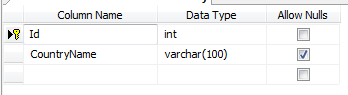
Before implement this example first design tables in your database as shown below :-


Add table name Country


Add some entries in country


Add table name State


add entry is state table 


Add table name City


add some entries in City table


ON ASPX PAGE :-


<table>
  <tr>
          <td><label class="Label">
                                    Country
                                </label>

          </td>
          <td><asp:DropDownList ID="ddCountryDrpdwn" CssClass="DropDown" runat="server" AutoPostBack="true"
                                    OnSelectedIndexChanged="ddCountryDrpdwn_SelectedIndexChanged">
                                </asp:DropDownList>
                                <asp:RequiredFieldValidator ID="RFVCountry" runat="server" ControlToValidate="ddCountryDrpdwn"
                                    Display="Dynamic" SetFocusOnError="true" ForeColor="Red" CssClass="failureNotification"
                                    ErrorMessage="Select country." InitialValue="0" ToolTip="Select country." ValidationGroup="sbmitbtn"></asp:RequiredFieldValidator>

          </td>
 </tr>
<tr>
          <td><label class="Label">
                                    State
                                </label>

          </td>
          <td><asp:DropDownList ID="ddStateDrpdwn" CssClass="DropDown" runat="server" AutoPostBack="true"
                                    OnSelectedIndexChanged="ddStateDrpdwn_SelectedIndexChanged">
                                </asp:DropDownList>
                                <asp:RequiredFieldValidator ID="RFVState" runat="server" ControlToValidate="ddStateDrpdwn"
                                    Display="Dynamic" SetFocusOnError="true" ForeColor="Red" CssClass="failureNotification"
                                    ErrorMessage="Select state." InitialValue="0" ToolTip="Select state." ValidationGroup="sbmitbtn"></asp:RequiredFieldValidator>

          </td>
 </tr>
<tr>
          <td><label class="Label">
                                    City
                                </label>

          </td>
          <td><asp:DropDownList ID="ddCityDrpdwn" CssClass="DropDown" runat="server" AutoPostBack="true"
                                    OnSelectedIndexChanged="ddCityDrpdwn_SelectedIndexChanged">
                                </asp:DropDownList>
                                <asp:RequiredFieldValidator ID="RFVCity" runat="server" ControlToValidate="ddCityDrpdwn"
                                    Display="Dynamic" SetFocusOnError="true" ForeColor="Red" CssClass="failureNotification"
                                    ErrorMessage="Select city." InitialValue="0" ToolTip="Select city." ValidationGroup="sbmitbtn"></asp:RequiredFieldValidator>

          </td>
 </tr>


</table>


On CODE BEHIND ASPX.CS PAGE


using System;
using System.Collections.Generic;
using System.Linq;
using System.Web;
using System.Web.UI;
using System.Web.UI.WebControls;
using BusinessLayer;
using DataLayer;
using System.Data;
using System.Data.SqlTypes;
using System.Data.SqlClient;
using System.Drawing;
using System.Globalization;
using System.Text.RegularExpressions;


 public void Page_Load(object sender, EventArgs e)
    {
        if (!IsPostBack)
        {

            Bindcountry();
        }
    }


 //Function to Bind Counrty
    protected void Bindcountry()
    {
        DS = BusinessLayer.Home.getcountry();
        if (DS.Tables[0].Rows.Count > 0)
        {

            ddCountryDrpdwn.DataSource = DS;
            ddCountryDrpdwn.DataTextField = "CountryName";
            ddCountryDrpdwn.DataValueField = "Id";
            ddCountryDrpdwn.DataBind();
            ddCountryDrpdwn.Items.Insert(0, new ListItem("--Select--", "0"));

        }
        else if (DS.Tables[0].Rows.Count == 0)
        {
            ddCountryDrpdwn.DataSource = null;
            ddCountryDrpdwn.DataBind();
        }

    }


 //Function to Bind State
    protected void Bindstate()
    {

        if (ddCountryDrpdwn.SelectedValue != "0")
        {
            int ctr = Convert.ToInt32(ddCountryDrpdwn.SelectedValue);
            DS = BusinessLayer.Home.getstate(ctr);
            if (DS.Tables[0].Rows.Count > 0)
            {
                ddStateDrpdwn.Focus();
                ddStateDrpdwn.DataSource = DS;
                ddStateDrpdwn.DataTextField = "StateName";
                ddStateDrpdwn.DataValueField = "Id";
                ddStateDrpdwn.DataBind();
                ddStateDrpdwn.Items.Insert(0, new ListItem("--Select--", "0"));


            }
            else if (DS.Tables[0].Rows.Count == 0)
            {
                ddStateDrpdwn.DataSource = null;
                ddStateDrpdwn.DataBind();
                ddStateDrpdwn.Focus();
            }
        }
        else
        {
            ddStateDrpdwn.Items.Insert(0, new ListItem("--Select--", "0"));
        }
    }

    //Function to Bind City
    protected void Bindcity()
    {

        if (ddStateDrpdwn.SelectedValue != "0")
        {
            int ctrr = Convert.ToInt32(ddStateDrpdwn.SelectedValue);
            DS = BusinessLayer.Home.getcity(ctrr);
            if (DS.Tables[0].Rows.Count > 0)
            {
                ddCityDrpdwn.Focus();
                ddCityDrpdwn.DataSource = DS;
                ddCityDrpdwn.DataTextField = "CityName";
                ddCityDrpdwn.DataValueField = "Id";
                ddCityDrpdwn.DataBind();
                ddCityDrpdwn.Items.Insert(0, new ListItem("--Select--", "0"));

            }
            else if (DS.Tables[0].Rows.Count == 0)
            {
                ddCityDrpdwn.Items.Clear();
                ddCityDrpdwn.DataSource = null;
                ddCityDrpdwn.DataBind();
                ddCityDrpdwn.Items.Insert(0, new ListItem("--Select--", "0"));
                ddStateDrpdwn.Focus();
            }
        }
        else
        {
            ddCityDrpdwn.Items.Insert(0, new ListItem("--Select--", "0"));
        }
    }

    //On Country selected  index change
    protected void ddCountryDrpdwn_SelectedIndexChanged(object sender, EventArgs e)
    {

        if (ddCountryDrpdwn.SelectedValue == "0")
        {
            ddStateDrpdwn.DataSource = ddCityDrpdwn.DataSource = null;
            ddStateDrpdwn.DataBind();
            ddCityDrpdwn.DataBind();
            ddStateDrpdwn.Items.Clear();
            ddCityDrpdwn.Items.Clear();
            ddStateDrpdwn.Items.Insert(0, new ListItem("--Select--", "0"));
            ddCityDrpdwn.Items.Insert(0, new ListItem("--Select--", "0"));
            ddCountryDrpdwn.Focus();
            txtLandlinecode.Text = "";

        }
        else
        {
            Bindstate();
        }
    }

    //On State selected  index change
    protected void ddStateDrpdwn_SelectedIndexChanged(object sender, EventArgs e)
    {
        if (ddStateDrpdwn.SelectedValue == "0")
        {
            ddCityDrpdwn.DataSource = null;
            ddCityDrpdwn.DataBind();
            ddCityDrpdwn.Items.Clear();
            ddCityDrpdwn.Items.Insert(0, new ListItem("--Select--", "0"));
            ddStateDrpdwn.Focus();
            txtLandlinecode.Text = "";
        }
        else
        {
            Bindcity();
        }
    }


ON BUSSINESSLAYER ADD CODE :-

        public static DataSet getcountry()
        {
            return DataLayer.Home.getcountry();
        }
        public static DataSet getstate(int ctr)
        {
            return DataLayer.Home.getstate(ctr);
        }
        public static DataSet getcity(int ctrr)
        {
            return DataLayer.Home.getcity(ctrr);
        }


ON DATALAYER ADD CODE :-

        //Get state
        public static DataSet getstate(int ctr)
        {
            List<SqlParameter> paralist = new List<SqlParameter>();

            SqlParameter para = new SqlParameter("@CountryName", ctr);
            paralist.Add(para);

            return DataLayer.Data.GetDataSet("usp_selectstate", paralist);
        }

        //Get City
        public static DataSet getcity(int ctrr)
        {
            List<SqlParameter> paralist = new List<SqlParameter>();

            SqlParameter para = new SqlParameter("@StateName", ctrr);
            paralist.Add(para);

            return DataLayer.Data.GetDataSet("usp_selectcity", paralist);
        }

        //for country bind from database
        public static DataSet getcountry()
        {
            return DataLayer.Data.GetDataByQery("select Id,CountryName from      Country");
        } 


ON YOUR DATA CLASS ADD CODE :- 

static string strConn = ConfigurationManager.AppSettings["DBConn"].ToString();
private static SqlConnection DBConn = null;

 public static DataSet GetDataByQery(string Query)
        {
            SqlConnection cn = Data.Connection;
            if (cn.State != ConnectionState.Open)
            {
                cn.Open();
            }
            SqlCommand cmd = new SqlCommand();
            cmd.CommandText = Query;
            cmd.CommandType = CommandType.Text;
            cmd.Connection = cn;

            DataSet ds = new DataSet();
            SqlDataAdapter da = new SqlDataAdapter();

            da.SelectCommand = cmd;
            da.Fill(ds);
            cn.Close();
            return ds;
        } 


public static DataSet GetDataSet(string SPName, List<SqlParameter> Parameters)
        {
            using (SqlConnection con = Connection)
            {
                using (SqlCommand cmd = new SqlCommand())
                {
                    cmd.CommandText = SPName;
                    cmd.CommandType = System.Data.CommandType.StoredProcedure;
                    cmd.Connection = con;

                    if (Parameters != null)
                    {
                        foreach (SqlParameter parameter in Parameters)
                        {
                            cmd.Parameters.Add(parameter);
                        }
                    }

                    if (con.State != ConnectionState.Open)
                    {
                        con.Open();
                    }
                    DataSet ds = new DataSet();
                    SqlDataAdapter da = new SqlDataAdapter();

                    da.SelectCommand = cmd;
                    da.Fill(ds);
                    con.Close();
                    return ds;
                }
            }
        } 


 IN YOUR WEBCONFIG ADD CODE :-

<appsetting>
<add key="DBConn" value="Data Source=XXXXXX; Initial Catalog=OskarDB; User ID=user; Password=pass;"/> 
<appsetting> 

STORED PROCEDURE :-

For selecting State :-

ALTER PROCEDURE [dbo].[usp_selectstate]
@CountryName int
As
BEGIN
    Select StateName,Id From State
    WHERE fkCountryId=@CountryName
    ORDER BY [StateName]ASC
END 


For selecting City :-  


ALTER PROCEDURE [dbo].[usp_selectcity]
@StateName int
As
BEGIN
    Select CityName,Id From City
    WHERE fkStateId = @StateName
    ORDER BY [CityName]ASC
END 


By following this way you can bind dependent dropdown list in 3 Tier . 

Tuesday, December 3, 2013

Validation CSS In ASP.NET

Validation CSS In ASP.NET

ASPX PAGE :-

<table cellpadding="0" cellspacing="30" >
            <tr>
                <td>
                    First Name:
                </td>
                <td>
                    <asp:TextBox ID="TextBox1" runat="server" />&nbsp;<asp:RequiredFieldValidator ID="RequiredFieldValidator1"
                        runat="server" CssClass="triangle-border left" ErrorMessage="FirstName Required"
                        ControlToValidate="TextBox1" ValidationGroup="submit"></asp:RequiredFieldValidator><asp:RegularExpressionValidator
                            ID="RegularExpressionValidator1" runat="server" ControlToValidate="TextBox1"
                            ValidationExpression="[a-zA-Z\s]+" CssClass="triangle-isosceles left" ErrorMessage="FName should be alphabetical"
                            Display="Dynamic" EnableClientScript="true"></asp:RegularExpressionValidator>
                </td>
            </tr>
            <tr>
                <td>
                    Last Name:
                </td>
                <td>
                    <asp:TextBox ID="TextBox2" runat="server" />&nbsp;<asp:RequiredFieldValidator ID="RequiredFieldValidator2"
                        runat="server" CssClass="triangle-border left" ErrorMessage="Last Name required"
                        ControlToValidate="TextBox2" ValidationGroup="submit"></asp:RequiredFieldValidator>
                    <asp:RegularExpressionValidator ID="RegularExpressionValidator2" runat="server" ControlToValidate="TextBox2"
                        ValidationExpression="[a-zA-Z\s]+" ErrorMessage="LName should be alphabetical"
                        CssClass="triangle-isosceles left" Display="Dynamic" EnableClientScript="true"></asp:RegularExpressionValidator>
                </td>
            </tr>
            <tr>
                <td>
                </td>
                <td>
                    <asp:Button ID="Button1" runat="server" Text="Submit" ValidationGroup="submit" OnClick="Button1_Click" />
                    <asp:Label ID="Label1" runat="server" Font-Bold="true" />
                </td>
            </tr>
        </table>


Bind Date In Chart Using Datebase IN 3 Tier in C#

Bind Date In Chart Using Datebase IN 3 Tier in C#.

First of all create table in database like


ON ASPX PAGE :-

<asp:Chart ID="Chart1" runat="server" ViewStateMode="Enabled" Width="700PX" Height="400PX"
        BackColor="Wheat">
        <Titles>
            <asp:Title Font="Times New Roman, 12pt, style=Bold, Italic" ForeColor="Red" Name="Title"
                Text="Oskar Tamrakar">
            </asp:Title>
        </Titles>
        <Series>
            <asp:Series Name="Series1" ToolTip="Percentage" ChartArea="ChartArea1" ChartType="Column"
                YValuesPerPoint="4" LegendToolTip="COuntry Name" Color="#CC0000">
            </asp:Series>
        </Series>
        <ChartAreas>
            <asp:ChartArea Name="ChartArea1">
                <Area3DStyle Enable3D="True" IsClustered="True" LightStyle="Realistic" Rotation="-20"
                    WallWidth="20" Inclination="10" />
            </asp:ChartArea>
        </ChartAreas>
    </asp:Chart>

ON CODE BEHIND :-

Name space :-

using System.Linq;
using System.Web;
using System.Web.Security;
using System.Web.UI;
using System.Web.UI.WebControls.WebParts;
using System.Web.UI.HtmlControls;
using System.Data.SqlClient;
using System.Data.SqlTypes;
using BusinessLayer.Entity;
using BusinessLayer.Manager;
using DataLayer.Data;
using System.Drawing;
using System.Text;
using System.IO;
using System.Drawing.Imaging;

protected void Page_Load(object sender, EventArgs e)
        {
            bind();
        }
        private void bind()
        {
            DataSet ds = new DataSet();
            ds = manager.Getcounrtyrecordsbyname();//stored procedure using 3 tier
            Chart1.DataSource = ds.Tables[0];
            Chart1.DataBind();
            Chart1.Legends.Add("CountryName").Title = "CountryName";
            Chart1.Series["Series1"]["DrawingStyle"] = "Emboss";
            Chart1.ChartAreas["ChartArea1"].Area3DStyle.Enable3D = true;
            Chart1.Series["Series1"].IsValueShownAsLabel = true;
            Chart1.ChartAreas["ChartArea1"].AxisX.Title = "CountryName";
            Chart1.ChartAreas["ChartArea1"].AxisY.Title = "CountryId";
            Chart1.Series["Series1"].XValueMember = "CountryName";
            Chart1.Series["Series1"].YValueMembers = "CountryId";
          
        }

ON BUSSINESS LAYER :-

public static DataSet Getcounrtyrecordsbyname()
        {
            return NGODataLayer.Group.Getcounrtyrecordsbyname();
        }


ON DATALAYER :-

public static DataSet Getcounrtyrecordsbyname()
        {
            return BusinessLayer.Dataaccess.DataAccess.GetData("usp_task6selectcountrytable", null);
        }

IN DATALAYER ADD CLASS DATA.CS :-

Ans paste code for GETDATA function.

public static DataSet GetData(string SPName, List<SqlParameter> Parameters)
        {
            using (SqlConnection con = new SqlConnection(System.Configuration.ConfigurationManager.ConnectionStrings["ApplicationServices"].ConnectionString))
            {
                using (SqlCommand cmd = new SqlCommand())
                {
                    cmd.CommandText = SPName;
                    cmd.CommandType = System.Data.CommandType.StoredProcedure;
                    cmd.Connection = con;

                    if (Parameters != null)
                    {
                        foreach (SqlParameter parameter in Parameters)
                        {
                            cmd.Parameters.Add(parameter);
                        }
                    }
                    con.Open();
                    DataSet ds = new DataSet();
                    SqlDataAdapter da = new SqlDataAdapter();
                    da.SelectCommand = cmd;
                    da.Fill(ds);
                    con.Close();
                    return ds;
                }
            }
        }


Just change CHART TYPE IN ASPX PAGE and get different type of chart


Show multiple file of your folder,download and delete from server in C#

Show multiple file of your folder,download and delete from server in C#

ASPX PAGE :-

<asp:GridView ID="GridView1" runat="server" AutoGenerateColumns="false" EmptyDataText="No files found">
        <RowStyle BackColor="Wheat" />
            <Columns>
                <asp:BoundField DataField="Text" HeaderText="Files" HeaderStyle-BackColor="DarkOrange" HeaderStyle-ForeColor="White"  />
                <asp:TemplateField HeaderText="Save" HeaderStyle-BackColor="DarkOrange" HeaderStyle-ForeColor="White" >
                    <ItemTemplate>
                        <asp:LinkButton ID="lnkDownload" Text="save" Width="70px" CommandArgument='<%# Eval("Value") %>'
                            runat="server" OnClick="DownloadFile"></asp:LinkButton>
                    </ItemTemplate>
                </asp:TemplateField>
                <asp:TemplateField HeaderText="Remove" HeaderStyle-BackColor="DarkOrange" HeaderStyle-ForeColor="White">
                    <ItemTemplate>
                        <itemtemplate>
                        <asp:LinkButton ID="lnkDelete" Text="Remove" width="100px" CommandArgument='<%# Eval("Value") %>'
                            runat="server" OnClick="DeleteFile"></asp:LinkButton>
                    </itemtemplate>
                    </ItemTemplate>
                </asp:TemplateField>
            </Columns>
        </asp:GridView>

NAMESPACES USED :-

using System;
using System.Collections.Generic;
using System.Linq;
using System.Web;
using System.Web.UI;
using System.Web.UI.WebControls;
using System.IO;

CODE BEHIND ASPX.CS :-

protected void Page_Load(object sender, EventArgs e)
        {
            if(!IsPostBack)
            {

                string[] filePaths = Directory.GetFiles(Server.MapPath("~/Images/"));               
                List<ListItem> files = new List<ListItem>();
                foreach (string filePath in filePaths)
                {
                    files.Add(new ListItem(Path.GetFileName(filePath), filePath));
                }
                GridView1.DataSource = files;
                GridView1.DataBind();
            }
        }

        protected void DownloadFile(object sender, EventArgs e)
        {
            string filePath = (sender as LinkButton).CommandArgument;
            Response.ContentType = ContentType;
            Response.AppendHeader("Content-Disposition", "attachment; filename=" + Path.GetFileName(filePath));
            Response.WriteFile(filePath);
            Response.End();
        }


        protected void DeleteFile(object sender, EventArgs e)
        {
            string filePath = (sender as LinkButton).CommandArgument;
            File.Delete(filePath);
            Response.Redirect(Request.Url.AbsoluteUri);
        }


Friday, November 29, 2013

Pop-Up Div Using Jquery

CSS :-

<style type="text/css">
        /* popup_box DIV-Styles*/#popup_box
        {
            display: none; /* Hide the DIV */
            position: fixed;
            _position: absolute; /* hack for
    internet explorer 6 */
            height: 175px;
            width: 400px;
            background: #FFFFFF;
            left: 300px;
            top: 150px;
            z-index: 100; /* Layering ( on-top of others), if you have lots of layers:
    I just maximized, you can change it yourself */
            margin-left: 15px; /* additional
    features, can be omitted */
            border: 2px solid #ff0000;
            padding: 15px;
            font-size: 15px;
            -moz-box-shadow: 0 0 5px #ff0000;
            -webkit-box-shadow: 0 0 5px #ff0000;
            box-shadow: 0 0 5px #ff0000;
        }
        #container
        {
            background: #d2d2d2; /*Sample*/
            width: 100%;
            height: 100%;
        }
        a
        {
            cursor: pointer;
            text-decoration: none;
        }
        /* This is for the positioning of
    the Close Link */#popupBoxClose
        {
            font-size: 20px;
            line-height: 15px;
            right: 5px;
            top: 5px;
            position: absolute;
            color: #6fa5e2;
            font-weight: 500;
        }
    </style>

Jquery :-

<script src="http://jqueryjs.googlecode.com/files/jquery-1.2.6.min.js" type="text/javascript"></script>
    <script type="text/javascript">

        $(document).ready(function () {

            // When site loaded, load the Popupbox First
            loadPopupBox();

            $('#popupBoxClose').click(function () {
                unloadPopupBox();
            });

            $('#container').click(function () {
                unloadPopupBox();
            });

            function unloadPopupBox() {    // TO Unload the Popupbox
                $('#popup_box').fadeOut("slow");
                $("#container").css({ // this is just for style      
                    "opacity": "1"
                });
            }

            function loadPopupBox() {    // To Load the Popupbox
                $('#popup_box').fadeIn("slow");
                $("#container").css({ // this is just for style
                    "opacity": "0.3"
                });
            }
        });
    </script>

ASPX CODE :-

<div id="popup_box">
            <h1>
                <table class="style1">
            <tr>
                <td>
                    <asp:Label ID="lblCountry" runat="server" Text="Country"></asp:Label>&nbsp;</td>
                <td>
                    <asp:TextBox ID="txtCountry" runat="server"></asp:TextBox>&nbsp;</td>
            </tr>
            <tr>
                <td>
                    <asp:Label ID="lblState" runat="server" Text="State"></asp:Label>&nbsp;</td>
                <td>
                    <asp:TextBox ID="txtState" runat="server"></asp:TextBox>&nbsp;</td>
            </tr>
            <tr>
                <td>
                    <asp:Label ID="lblCity" runat="server" Text="City"></asp:Label>&nbsp;</td>
                <td>
                    <asp:TextBox ID="txtCity" runat="server"></asp:TextBox>&nbsp;</td>
            </tr>
            <tr>
                <td>
                    &nbsp;</td>
                <td>
                    <asp:Button ID="btnsa" runat="server" Text="Button" OnClientClick="save();" />&nbsp;</td>
            </tr>
        </table></h1>
            <a id="popupBoxClose">Close</a>
        </div>


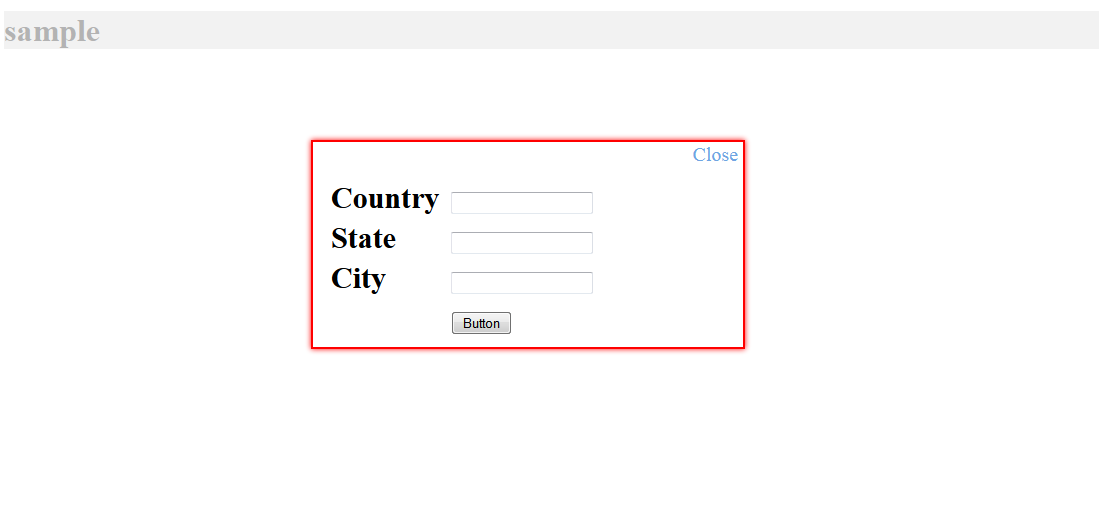
POPUP DIV LOOK LIKE THIS :-


Another Method of Bind Gridview using JSON

JQUERY :-

<script type="text/javascript" src="http://ajax.googleapis.com/ajax/libs/jquery/1.8.3/jquery.min.js"></script>
<script type="text/javascript">
        $(function () {
            $.ajax({
                type: "POST",
                url: "BindgridusingWebMethod.aspx/GetUserInfoData",
                data: '{}',
                contentType: "application/json; charset=utf-8",
                dataType: "json",
                success: OnSuccess,
                failure: function (response) {
                    alert("Failure : " + response.d);
                },
                error: function (response) {
                    alert("Error : " + response.d);
                }
            });
        });

        function OnSuccess(response) {
            var xmlDoc = $.parseXML(response.d);
            var xml = $(xmlDoc);
            var users = xml.find("Table");
            //create a new row from the last row of gridview
            var row = $("[id*=grdDemo] tr:last-child").clone(true);
            //remove the lst row created by binding the dummy row from code behind on page load
            $("[id*=grdDemo] tr").not($("[id*=grdDemo] tr:first-child")).remove();
            var count = 1;
            $.each(users, function () {
                //var users = $(this);               
                $("td", row).eq(0).html($(this).find("FullName").text());
                $("td", row).eq(1).html($(this).find("DOB").text());
                $("td", row).eq(2).html($(this).find("Gender").text());
                $("td", row).eq(3).html($(this).find("MobileNo").text());
                $("td", row).eq(4).html($(this).find("Salary").text());
                $("td", row).eq(5).html($(this).find("Isactive").text());
                $("[id*=grdDemo]").append(row);
                //define the background stryle of newly created row        
                if (count == 1 || (count % 2 != 0)) {
                    $(row).css("background-color", "#ffffff");
                }
                else {
                    $(row).css("background-color", "#D2CDCD");
                }
                count = count + 1;
                row = $("[id*=grdDemo] tr:last-child").clone(true);
            });
        }
    </script>

ASPX CODE :-

<asp:ScriptManager ID="ScriptManager1" runat="server" EnablePageMethods="true">
    </asp:ScriptManager>
<asp:Button ID="btnshowgrid" runat="server" Text="Show Gridview" OnClick="btnshowgrid_Click" />&nbsp;<asp:Button
        ID="clear" runat="server" Text="Clear" onclick="clear_Click" />
<div>
        <asp:GridView ID="gvDetails" runat="server" >
            <HeaderStyle BackColor="#474747" Font-Bold="true" ForeColor="White" />
        </asp:GridView>
        <br />
        <asp:GridView ID="grdDemo" runat="server" AutoGenerateColumns="false">
        <HeaderStyle BackColor="#474747" Font-Bold="true" ForeColor="White" />
            <Columns>
                <asp:BoundField DataField="FullName" HeaderText="Full Name" />
                <asp:BoundField DataField="DOB" HeaderText="DOB" />
                <asp:BoundField DataField="Gender" HeaderText="Gender" />
                <asp:BoundField DataField="MobileNo" HeaderText="Mobile No." />
                <asp:BoundField DataField="Salary" HeaderText="Salary" />
                <asp:BoundField DataField="Isactive" HeaderText="Isactive" />
           </Columns>
        </asp:GridView>
    </div>

CODE BEHIND :-

protected void btnshowgrid_Click(object sender, EventArgs e)
        {
            BindgridRow();
        }

private void BindgridRow()
        {
            DataTable dummy = new DataTable();
            dummy.Columns.Add("FullName");
            dummy.Columns.Add("DOB");
            dummy.Columns.Add("Gender");
            dummy.Columns.Add("MobileNo");
            dummy.Columns.Add("Salary");
            dummy.Columns.Add("Isactive");
            dummy.Rows.Add();
            grdDemo.DataSource = dummy;
            grdDemo.DataBind();
        }

[WebMethod]
        public static string GetUserInfoData()
        {
            string query = "SELECT FullName,CONVERT(varchar(30),DOB,101) AS DOB,Gender,MobileNo,Salary,Isactive    FROM form ORDER BY Pid ";
            string strConnString = ConfigurationManager.ConnectionStrings["ApplicationServices"].ConnectionString;
            using (SqlConnection con = new SqlConnection(strConnString))
            {
                using (SqlCommand cmd = new SqlCommand(query, con))
                {
                    using (SqlDataAdapter sda = new SqlDataAdapter())
                    {
                        cmd.Connection = con;
                        sda.SelectCommand = cmd;
                        using (DataSet ds = new DataSet())
                        {
                            sda.Fill(ds);
                            return ds.GetXml();
                        }
                    }
                }
            }
        }

protected void clear_Click(object sender, EventArgs e)
        {
            grdDemo.DataSource = null;
            grdDemo.DataBind();
        }

CLICK ON BUTTON :-